
Download Webian Shell – full-screen web browser, modern web apps, lightweight computing, web-based productivity, minimalist interface, prototype browser
Overview
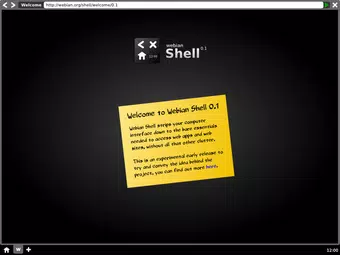
Webian Shell presents a bold reimagining of the traditional computing interface by replacing desktop environments with a full-screen web browser. Designed for devices that do not require a conventional desktop, it focuses exclusively on web-based applications, offering a streamlined and distraction-free experience. This prototype browser aims to simplify digital workflows by centering all activity around modern web apps, enabling users to access tools, media, and services directly through the browser without the overhead of traditional operating system interfaces.
The app targets users who prioritize web-based productivity, such as remote workers, students, and digital creators relying heavily on online platforms. It is particularly well-suited for lightweight devices like tablets and low-powered laptops where performance and simplicity are critical. By eliminating desktop clutter and minimizing system-level distractions, Webian Shell enhances focus and efficiency, allowing users to engage deeply with web applications without unnecessary interruptions.
Developed by Webian, the app reflects a growing trend toward web-native computing, leveraging advancements in browser technology to deliver desktop-like functionality. Although the developer did not provide additional technical details about the underlying architecture, the prototype form suggests an experimental yet purposeful direction in mobile and lightweight computing. Its presence in the app ecosystem highlights the potential for web applications to function as primary computing platforms, especially in environments where minimalism and speed are paramount.
Key Features & Functionality
- Full-Screen Browser Interface: Webian Shell operates without traditional desktop elements, replacing them with a dedicated, immersive web browser. This interface ensures that every pixel is used for web content, maximizing screen real estate and reducing visual noise.
- Minimalist Design Philosophy: The interface emphasizes clarity and simplicity, with intuitive navigation and a clean layout. Users are presented with direct access to web apps, minimizing the need for complex menus or settings.
- Support for Modern Web Applications: The shell treats web apps as first-class citizens, enabling full functionality including advanced graphics rendering, audio and video playback, and offline data storage. This allows users to run complex tools like cloud-based editors, video conferencing platforms, and media players directly in the browser.
- Prototype Access for Early Adopters: As a prototype, Webian Shell is available for users to explore its core concepts and provide feedback. This open access model supports iterative development and community-driven refinement.
- Optimized for Lightweight Devices: The app is tailored for devices with limited processing power or memory, making it ideal for entry-level tablets and netbooks that rely primarily on web connectivity.
For example, a student using a low-end tablet can launch a web-based note-taking app, watch lecture videos, and collaborate in real time—all within a single, uninterrupted interface. Similarly, a remote worker can use cloud-based design tools or project management platforms without the overhead of a full desktop OS.
Interface, UX & Performance
Webian Shell features a clean, minimalist interface that prioritizes functionality over visual ornamentation. The full-screen layout ensures that web content dominates the display, with navigation elements integrated seamlessly into the browser’s core functions. Users interact directly with web applications, with no visible desktop icons, taskbars, or system menus to divert attention.
Navigation is designed to be intuitive, relying on standard browser gestures and controls. The app maintains consistent responsiveness across different screen sizes and device types, though the developer did not list formal performance metrics. Although the developer did not specify minimum OS requirements, the app’s lightweight nature suggests compatibility with a broad range of Android devices.
Stability appears to be a focus in the prototype phase, with minimal reported disruptions. However, since the app is in early development, users should expect occasional bugs or incomplete features. The overall user experience is smooth and focused, aligning with the app’s goal of reducing cognitive load and enhancing productivity through simplicity.
Platform Compatibility & Technical Requirements
Webian Shell is available for Android devices. The current version is 1.0.0, with a file size of 24.6 MB, making it a lightweight download suitable for devices with limited storage. The app is offered free of charge, removing financial barriers to access.
The developer did not specify minimum OS requirements or compatibility details for specific Android versions. As such, users should ensure their device meets general Android standards for running web applications. Compatibility information was not fully disclosed, so installation may vary depending on device configuration.
Pros and Cons
Pros
- Full-screen interface enhances focus and immersion in web content.
- Minimalist design reduces distractions and simplifies user interaction.
- Supports advanced web app features such as offline storage and multimedia playback.
- Lightweight size (24.6 MB) ensures quick installation and low storage usage.
- Free to download and use, promoting accessibility for all users.
Cons
- Currently available only as a prototype, which may limit long-term stability.
- Specific technical requirements and compatibility details were not listed.
- Limited functionality compared to full desktop environments.
- May not support legacy or non-web-based applications.
- Early-stage development may result in missing features or bugs.
FAQ
Is Webian Shell safe to install on Android?
Yes, the app is free and available through official channels. As a prototype, it does not require elevated permissions beyond standard web browser access. Users should ensure they download from trusted sources.
Can I use Webian Shell on iOS devices?
Currently, Webian Shell is only available for Android. There is no official iOS version or indication of future support.
Does Webian Shell support offline web applications?
Yes, the app supports modern web technologies, including offline storage, allowing certain web apps to function without an internet connection.
How do I update Webian Shell?
Updates are managed through the app store. Users should check for updates regularly to access new features and improvements.
Is Webian Shell suitable for daily productivity?
Yes, for users whose workflows are primarily web-based, Webian Shell offers a streamlined, focused environment ideal for productivity tasks like note-taking, video conferencing, and document editing.
Final Thoughts
Webian Shell represents a forward-thinking approach to mobile and lightweight computing. By centering the user experience around modern web applications and eliminating desktop clutter, it delivers a refreshingly simple alternative to traditional interfaces. While still in prototype form, its minimalist design, support for advanced web features, and lightweight footprint make it a compelling tool for users who rely on the web for work, learning, and entertainment.
Although not yet a full replacement for desktop operating systems, Webian Shell demonstrates the growing viability of web-native environments. It is especially valuable for users with limited devices or those seeking a distraction-free digital workspace. The free availability and open development model further enhance its appeal.
Download Webian Shell now and experience the future of web-based productivity.


